ElevenLabs Sound Effects: Generate AI Sound Effects for Video and Games
ElevenLabs Sound Effects generates standalone ambience and foley sounds from prompts, with up to 30 seconds per generation. Use loops for continuing environments and verify format and license before publication.
What ElevenLabs Sound Effects does, and when to use it
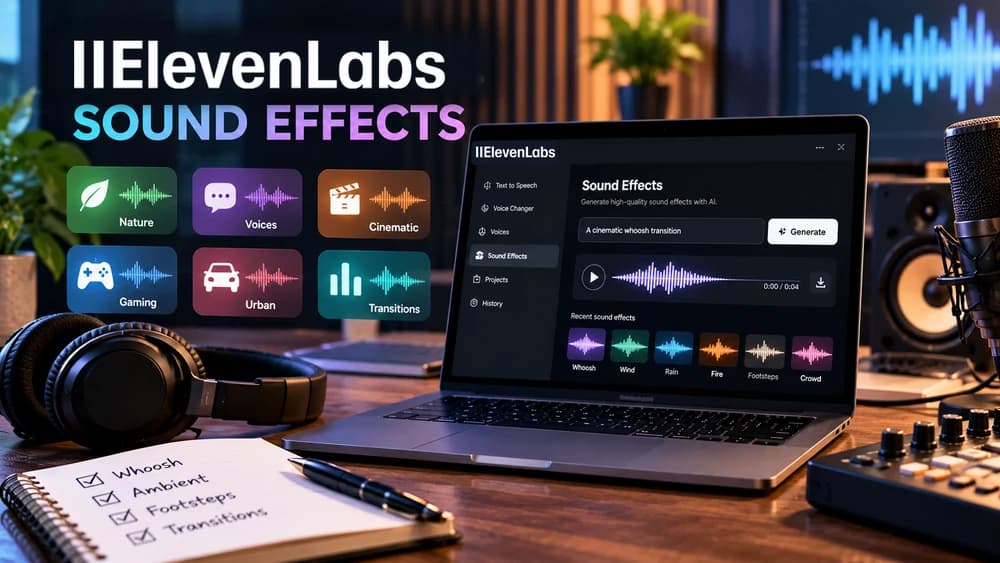
ElevenLabs Sound Effects turns a written description into audio such as footsteps, rainfall, metallic impacts, room ambience, or cinematic transitions. It is a separate capability from text-to-speech, Voice Changer, and Voice Isolator. When an edit needs a realistic environmental sound rather than a spoken line, Sound Effects is the relevant tool. For a narrated video, you can combine a voiceover generated or recorded elsewhere with an independently designed ambience layer.
Start by identifying the role of the sound in your project: a one-shot impact, a quiet continuous backdrop, or a texture that can repeat. That distinction determines your wording, requested duration and whether looping is appropriate. The official guide covers the Sound Effects workspace and settings: https://elevenlabs.io/docs/eleven-creative/playground/sound-effects. This article is a documented workflow, not the result of a live ElevenLabs audio quality test.
Create your first sound effect in the Playground
Open ElevenLabs and choose Sound Effects from the Playground sidebar. In the text field, describe one audible event: its source, action, acoustic environment and, if relevant, distance. A useful example for a walking scene is: 'Close dry footsteps on loose gravel in a quiet outdoor courtyard, irregular walking pace, natural recording, no voices.' Then choose the duration or leave Auto selected so the generator can decide how much audio is needed.
Choose Generate and review the resulting alternatives instead of downloading the first file immediately. The current ElevenLabs product guide describes four sound-effect variations per generation and options to revisit History or save a favorite. Interface placement may change, so follow the labels shown in your own account. Reference: https://elevenlabs.io/docs/eleven-creative/playground/sound-effects.
Write an effective prompt with source, texture and space
A strong prompt answers what makes the sound recognizable. Rather than 'rain', try 'Steady heavy rain striking a metal greenhouse roof, close perspective, irregular large drops, faint outdoor air, no thunder or music.' Rather than 'door', try 'An old wooden interior door opening slowly, dry hinge squeak followed by a gentle latch click, small reverberant room.' These are proposed prompt examples, not audio files that Claim26 has generated or evaluated.
Keep the main event in focus. ElevenLabs supports natural-language prompts and audio terms such as ambience, impact, whoosh, one-shot and drone. Its help center states a maximum prompt length of 450 characters in the Sound Effects interface. If you want a precise sequence of unrelated events, the company recommends creating the components separately and assembling them in an audio editor rather than demanding that the model execute a long choreography. Sources: https://elevenlabs.io/docs/help-center/product/core-capabilities/sound-effects/what-is-sound-effects and https://elevenlabs.io/docs/help-center/product/core-capabilities/sound-effects/how-do-i-prompt-for-sound-effects.
Three ready-to-adapt prompts for a video, game and podcast
For a product demonstration, try: 'Single clean mechanical switch click, high-quality close foley, short sharp attack and quiet tail, dry studio recording, no voices.' For a game environment, try: 'Soft winter wind threading through pine branches, distant low gusts, expansive outdoor ambience, no footsteps or animals, seamless atmosphere.' For a podcast transition, try: 'Brief textured air whoosh sweeping gently from left to right, subtle cinematic shimmer, crisp finish, no speech or music.'
The first and third examples are short one-shot candidates; the wind ambience may be better evaluated as a loop. Record your intended use beside each prompt, such as background below narration, a button interaction or a scene transition. That encourages objective comparison: does the clip communicate the intended event at the intended volume? Avoid claiming an effect is stereo, isolated, royalty-free or perfect for gameplay until its actual file and license have been checked.
Duration and looping: a 30-second limit is not an unlimited clip
The documented maximum Sound Effects generation duration is 30 seconds. The product interface allows you to specify a length or select Auto. The looping option aims to create audio whose end connects to its beginning without an obvious discontinuity, which is often more useful for rainfall, wind, engine hum or environmental room tone than for a single bell strike. A loop can be repeated in an editor to cover a longer scene, but it is not a continuous 10-minute generation.
A practical check is to duplicate the loop twice on a timeline and listen over the junction with headphones. If a change in loudness or rhythm reveals the seam, try a different variation or regenerate with a more stable ambience prompt. For a one-shot event, do not turn on looping merely because your video lasts a long time. The current capability documentation confirms 30 seconds, loop behavior and format distinctions: https://elevenlabs.io/docs/overview/capabilities/sound-effects.
Prompt influence and variations: balance fidelity with discovery
ElevenLabs exposes a prompt-influence setting in its Playground guide, with a documented default of 30 percent. Higher or lower values can change how strongly the generator follows your wording; the most suitable setting depends on whether you need a very specific foley cue or are exploring sonic ideas. Do not assume a percentage increase guarantees a more realistic effect, or that the same prompt always produces identical results.
Listen to all available variations, then compare a single controlled change: perhaps replace 'distant' with 'close', or reduce a crowded description to one clear event. Preserve the original prompt and the selected file name when making several rounds so you can tell what changed. This is an editorial test procedure, not a claim that Claim26 measured or benchmarked the tool. The current settings are described at https://elevenlabs.io/docs/eleven-creative/playground/sound-effects.
Exports: distinguish MP3 from non-looping WAV availability
The current Sound Effects guide describes download choices including MP3 at 44.1 kHz and WAV at 48 kHz in the Playground. The technical capability overview is more specific: MP3 is listed for sound effects generally, while 48 kHz WAV is documented for non-looping effects. These descriptions should be read together rather than assuming every account and every looping result supports every export combination.
Choose an export after reviewing the available formats on the generated file. MP3 is convenient for many quick editing workflows. When a compatible uncompressed WAV export is actually offered, it can be useful for later processing, but file format alone does not correct a poor prompt or a noisy mix. Save an untouched version of the selected download and a separate edited copy. Documentation: https://elevenlabs.io/docs/overview/capabilities/sound-effects and https://elevenlabs.io/docs/eleven-creative/playground/sound-effects.
Control credits and avoid paying for unnecessary generations
Sound Effects generation uses an account's available usage or credits under the provider's current product rules. The total depends on the actual account and pricing in effect, so a blog post should not promise a specific free sound allowance or a universal price per clip. Open the relevant pricing or usage panel before experimenting. A long trial-and-error chain can consume resources even when none of the variations is eventually used in a finished video.
Prepare a small sound list before generating: name the required event, intended scene length, whether a loop is necessary and the one quality criterion that matters most. Start with one concise prompt per sound, compare its variations and regenerate only when a specific problem remains. This makes the workflow more efficient without pretending to know the provider's private usage ledger. Official product guide: https://elevenlabs.io/docs/eleven-creative/playground/sound-effects.
Commercial rights: free-plan audio is not automatically licensed for ads
ElevenLabs states that content generated on the free plan, or without a signed-in paid subscription, does not include a commercial license. Noncommercial distribution of free-plan generations carries attribution requirements. Paid plans generally allow commercial use of qualifying content created during the paid period, subject to the service terms, rights you hold and restrictions for beta services. A later upgrade does not automatically convert a sound previously generated for free into a commercially licensed file.
Before placing generated audio into a monetized YouTube video, paid ad, commercial game or client deliverable, check when and under which account status the specific file was generated and review the current terms. Avoid audio designed to misrepresent an actual news event or to impersonate a real recording deceptively. This is a practical caution rather than legal advice; the provider's legal statement is at https://elevenlabs.io/docs/help-center/legal/can-i-publish-the-content-i-generate-on-the-platform.
Finish a clean mix and decide whether Sound Effects fits
After downloading your chosen effect, place it on a separate timeline track so its loudness can be controlled independently of speech. For a whoosh or click, check whether the transient masks an important spoken syllable. For a background ambience, listen on both headphones and a laptop speaker at realistic playback levels. A short fade may help a transition, but a loop still needs a clean seam and a sensible level. Keep the original and final mixed versions organized for later editing.
Sound Effects is a good candidate when you need original environmental audio from a text description and are willing to compare variations. It is not the right tool for isolated transcription or changing an existing speaker's voice; choose voice tools for those needs. For a wider purchase decision, consult the Claim26 ElevenLabs free-plan and product-review guides, and verify the current commercial rights before a paid project. This tutorial does not claim that a paid ElevenLabs account, generation or commission was tested.
Check these four signals.
✓Describe one sound event with acoustic details
✓Choose one-shot versus seamless loop by scene
✓Compare variations and formats before export
✓Check current account credits and usage rights
Need the bigger picture before choosing a plan?
Open the current offer and check ElevenLabs pricing, limits and features before deciding on a subscription.
Official sources for this guide
Software pricing and features can change. Review the official documentation below before choosing a product or plan.