ElevenLabs Voice Isolator: Remove Background Noise From Speech
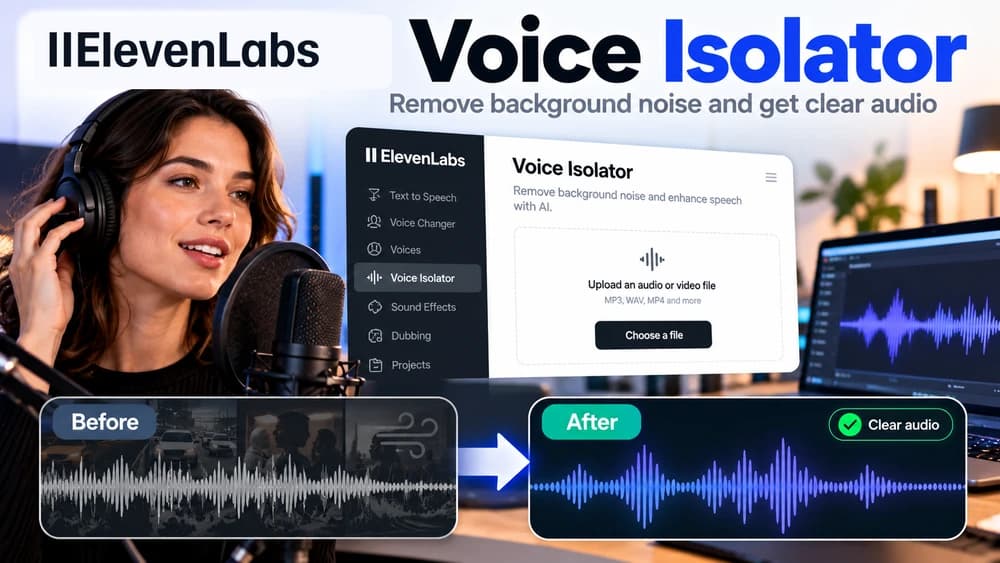
Upload noisy recorded speech to Voice Isolator, compare the processed audio with your original, then use the cleaned file only if key words remain accurate.
Decide whether your recording needs voice isolation
ElevenLabs Voice Isolator extracts spoken dialogue from background sounds. Its job is to reduce competing noises in an existing recording, not to clone a person's voice, generate speech from text or produce a written transcript. That distinction matters when choosing an ElevenLabs workflow and estimating its cost.
Imagine a fictional podcast interview recorded near a busy street. The speaker is mostly understandable, but traffic and ambient noise make the recording tiring to listen to. Isolation might make it easier to edit; it cannot guarantee faithful recovery of syllables never captured by the microphone. This tutorial follows the vendor's documentation and does not claim a firsthand paid audio test.
Confirm file formats, one-hour duration and 500MB size
The ElevenLabs capability guide lists audio formats including AAC, AIFF, OGG, MP3, OPUS, WAV, FLAC and M4A. It also lists video containers such as MP4, AVI, MKV, MOV, WMV, FLV, WEBM, MPEG and 3GPP. That is useful when spoken audio is inside a video file and you do not want to extract the soundtrack in a separate application.
The published upload limit is one hour and 500 MB for an individual file. If an interview exceeds either limit, divide it at natural pauses so you do not cut words between segments. Keep the original recording and obtain appropriate permission before uploading identifiable voices or sensitive conversations to a third-party service.
Prepare a representative audio sample first
Select a short section that contains clear speech, the specific background problem and a transition or pause. A consistent fan hum may behave differently from crowd chatter or loud music. Listening to a representative sample before processing gives you a meaningful point of comparison and avoids judging quality from silence alone.
Keep a copy of the unprocessed source and label the test export clearly. Avoid adding multiple harsh noise-reduction filters beforehand if you can help it, because each stage may introduce artifacts. Compare the same words at similar playback levels when assessing whether isolation actually improved intelligibility.
Use Voice Isolator in the ElevenLabs web app
Open ElevenLabs and navigate to Voice Isolator under Audio Tools. The product guide says you can upload an audio file, drag and drop it onto the interface, or record new audio using the device microphone. Choose the intended source and review the duration and any account usage estimates shown before starting.
Select Isolate voice to process the recording. When the result is ready, the app provides playback and a way to download the isolated audio. The exact interface may change as the product develops, so prefer the live product controls and current official documentation over screenshots from an older tutorial.
Listen for missing consonants and processing artifacts
Test several sentences, not merely the quietest section. Check whether word endings, consonants, pauses, breaths or overlapping voices have become unnatural. A cleaner waveform and lower noise floor are not evidence of a successful result if an important word disappears. In an interview, faithful speech matters more than a perfectly silent background.
Compare the processed file with the original using matching sections and listening levels. Preserve the original for quotations and editorial review. Do not fill in inaudible words from memory or present a processed recording as an unaltered source when disclosure is important.
Understand the credit cost without inventing a cash price
The ElevenLabs capabilities documentation currently describes Voice Isolator usage as 1,000 characters for each minute of processed audio. The web product and ElevenAPI may have different plan rules or pricing. Check the current credit balance and plan allowances in your own account instead of assuming this feature is always free.
On that documented rate, a ten-minute file corresponds to approximately 10,000 character units. This is an illustrative credit calculation, not a dollar price, a quote for a subscription, or evidence of an account test. A short test segment is the safer way to assess whether a longer paid processing job would be worthwhile.
Know what the model is not optimized to do
ElevenLabs states that Voice Isolator is not specifically optimized to separate singing vocals from music. It may sometimes work on music-heavy recordings, but a mixed song, heavy crowd noise or two simultaneous speakers can still create problems. The product should not be presented as a guaranteed source separator for every soundtrack.
If your task is generating narration, the relevant feature is text to speech. If you need the same content performed in another voice, investigate voice changer or authorized cloning. If your target output is captions, use speech to text. Voice isolation is a preparation step for some of these workflows, not an automatic replacement for them.
Consider the API for repeatable audio cleanup
The official API exposes POST /v1/audio-isolation and accepts an uploaded audio file as multipart form data. ElevenLabs also provides client libraries and a cookbook showing how to pass audio bytes to the isolation method. This can help a production team prepare interview files for later editing or transcription.
Keep the API key in a secure server environment or secret manager, never in the browser-facing JavaScript or a public repository. Before integrating, validate accepted formats, file limits, response handling and failure cases on recordings you are authorized to use. No ElevenLabs API processing was performed for this article.
Connect cleaned dialogue to editing or transcription
For a film or podcast, you can place the cleaned dialogue into your editing timeline while keeping an accessible original source. For subtitles, first compare the cleaned recording against the original, then submit it to a transcription service such as Scribe if appropriate. Poorly processed consonants can create transcription errors even if the background becomes quieter.
Keep filenames, sample timing and versions consistent across tools. Review quotations, proper names and timecodes manually where accuracy matters. Treat AI audio cleanup and AI transcription as separate operations, each requiring its own quality check, not as an automatic proof that the final text is correct.
Decide whether to process, rerecord or leave the audio alone
Try Voice Isolator when the voice is still audible but an ambient layer gets in the way. If you can rerecord with a microphone closer to the speaker in a quieter room, that may preserve nuance better than aggressive post-processing. For recordings that are already clear, avoid unnecessary processing that changes the voice's natural texture.
Claim26's Scribe transcription guide addresses converting recordings into text, and its voice cloning guide explains a different use case requiring consent. Use the ElevenLabs review and free-plan guides to evaluate the broader platform and current restrictions before purchasing anything. A demo result and a credit estimate are not promises of income, search traffic or perfect audio.
Check these four signals.
✓Original recording and rights preserved
✓Up to one hour and 500MB per file
✓Current credit allowance checked
✓Word endings and dialog preserved
Need the bigger picture before choosing a plan?
Open the current offer and check ElevenLabs pricing, limits and features before deciding on a subscription.
Official sources for this guide
Software pricing and features can change. Review the official documentation below before choosing a product or plan.