MailerLite vs Kit (ConvertKit) in 2026: Which Email Platform Is Better?
Kit Free supports up to 10,000 subscribers and unlimited broadcasts, with limited basic automation. MailerLite Free offers three active automations but caps subscribers at 250 and emails at 2,500 per month.
The differences that actually change the decision.
MailerLite vs Kit: the short answer
Choose Kit (formerly ConvertKit) if you want room for a large free newsletter audience, unlimited free broadcasts, and a creator-oriented way to sell digital products. Choose MailerLite if you want to test a more structured email-marketing funnel with several basic visual automations on a small free list. The right choice depends on subscriber count, send frequency, required workflows, and whether you sell products or simply publish a newsletter.
The key 2026 change is easy to miss: MailerLite reduced its free limit on June 16, 2026 to 250 active subscribers and 2,500 emails per month, while allowing up to three active automations. Kit advertises a free Newsletter plan for up to 10,000 subscribers, unlimited broadcasts and one basic visual automation on its pricing page. Full visual automation and email sequences require a paid Kit tier. Confirm the exact free-plan behavior in your account before building a campaign.
This is an editorial comparison based on official pricing and product documentation checked on November 3, 2026, not an account-level test. Claim26 may earn a commission from eligible MailerLite purchases through clearly labeled affiliate buttons; its links to Kit and source documentation are ordinary non-affiliate references.
MailerLite vs Kit: free plans at a glance
At first sight, Kit wins on the number of subscribers a free account can hold. That is useful to an author, creator, or newsletter operator with a growing reader list. MailerLite wins a different trade-off: it allows three free automation workflows for a smaller contact database, subject to a low monthly sending allowance.
The comparison should not be confused with a claim that one product is better at deliverability. Both enforce sending policies, and neither vendor's plan allowance guarantees an inbox placement rate. Sending volume, permission-based subscribers, domain authentication and the quality of your campaigns still matter.
What does MailerLite's free plan really include in 2026?
On June 16, 2026 MailerLite changed its Free plan from 500 to 250 active subscribers and lowered its sending allowance from 12,000 to 2,500 emails per month. In exchange, its free users gained broader access to design tools such as custom templates and promotional pop-ups. Current documentation lists two user seats, three automations, three forms, a website of up to five pages, one landing page and one digital product.
These limits are practical, not merely suggestions. When an account crosses the subscriber or sending thresholds, MailerLite can pause campaigns and automations until the subscriber count is reduced, the cycle resets when applicable, or the account is upgraded. A form may continue displaying while new contacts or email sending are restricted, so test the entire subscription flow before relying on it for a promotion.
MailerLite counts one email sent to one recipient as one send. A campaign addressed to 200 contacts consumes 200 sends; repeating it five times consumes 1,000 sends before follow-up automation emails are counted. It is therefore possible to outgrow the free sending allowance without reaching the 250-subscriber ceiling.
What does Kit's free Newsletter plan include?
Kit's published Free plan is designed for a creator who wants to build an owned audience before paying for advanced workflows. It advertises up to 10,000 subscribers, unlimited email broadcasts, unlimited signup forms and landing pages, audience tagging, digital products, subscriptions, and free creator recommendations. The subscriber allowance is much larger than MailerLite's free limit.
There is an important feature-label nuance: Kit's pricing page lists one basic Visual Automation on the free tier, while its help guidance broadly groups visual automations and sequence features under the paid plans. Treat the free flow as a limited starting tool rather than assuming it can replace a multi-stage email sequence with branching, event triggers and several entry points.
Kit is especially interesting when a creator primarily publishes one regular newsletter to a growing list, needs multiple entry forms, and is happy to work within the basic free automation limits. A serious welcome series, segmentation-driven onboarding or a launch funnel may require the Creator plan.
Paid pricing: compare the same list size and billing period
MailerLite currently lists Comfort from $12/month for its smallest subscriber tier, and Power from $25/month. Comfort includes 50 active automations and paid functionality such as expanded templates, smart sending and additional website or form capacity. Power includes unlimited automation counts and broader sending and team limits, subject to published conditions. MailerLite's price rises with your subscriber tier; its $12 entry price is not the price for every list size.
Kit's public pricing selector shows Creator at around $33/month when $390 is billed for a year for a 1,000-subscriber example. The Pro tier is shown around $66/month when $790 is billed annually at the same example size. Creator unlocks unlimited visual automations and email sequences; Pro adds more team and reporting capabilities. Other subscriber levels, monthly billing, taxes and promotions can change the actual checkout amount.
It would be misleading to proclaim that $12 MailerLite and $33 Kit are directly comparable for the same workload: their published entry screens use different subscriber tiers and billing assumptions. To choose fairly, set the same active subscriber count, annual or monthly billing preference, expected number of sends, and required automation features on both vendors' live pricing pages.
A realistic sending-cost example
Suppose you have 180 active subscribers and send a weekly newsletter. Four editions sent to the whole list require about 720 sends in a month. Add a three-email welcome sequence delivered to 20 new subscribers and the illustrative total becomes 780 sends. This example fits within MailerLite's published 2,500-email free allowance and may fit within its three-automation ceiling, depending on your exact workflow.
Now suppose your list grows to 800 active subscribers and you send four editions per month. That produces roughly 3,200 sends before any automation emails. MailerLite Free does not apply because the list exceeds 250, so you need an eligible paid plan. Kit's free list and broadcast allowances make it a candidate when you only need ordinary broadcasts, but its limited free automation features may push a funnel-heavy business toward Creator.
These figures are simple planning examples, not measured performance, conversion rates or customer usage. Account rules and billing tiers should still be checked at the point of purchase.
Email automation: where the two products differ
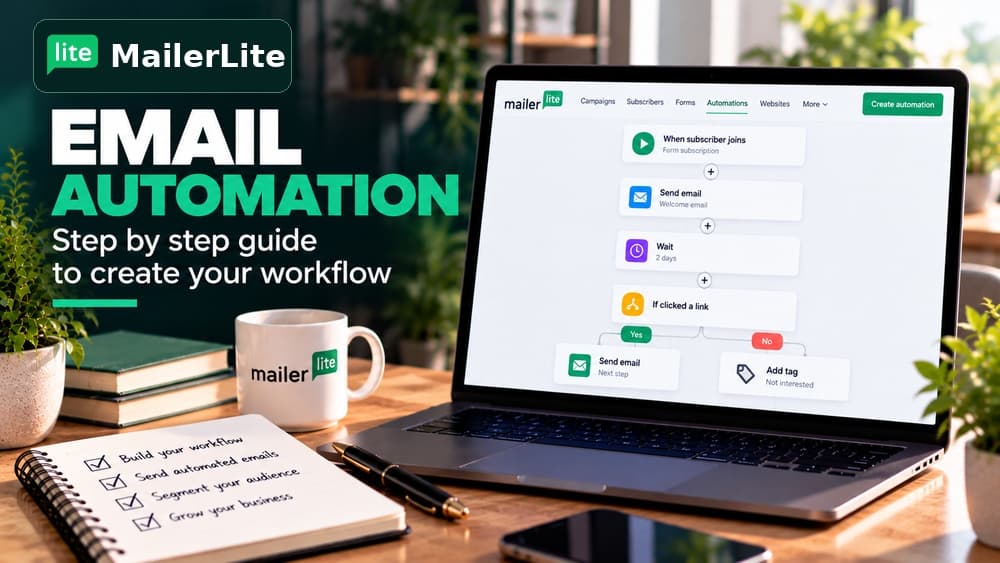
An automation is a rule that starts actions after a subscriber signs up, joins a group, changes an attribute or performs a supported event. A genuinely useful workflow might deliver a lead magnet, wait two days, send an educational lesson, and then send a relevant product invitation. The important question is whether your plan supports the triggers and editing steps needed for that exact sequence.
MailerLite publishes a visual workflow editor and permits three active automations on its current free plan. Paid Comfort raises the allowance to 50, while Power has unlimited active feature counts. Multiple triggers per workflow and certain advanced controls depend on the plan; the presence of an automation builder alone does not mean every trigger is free.
Kit's Creator plan emphasizes unlimited visual automations and unlimited email sequences. Its free Newsletter tier is more appropriate for basic audience capture and routine broadcasts. If you need a sales funnel with several segments, events and courses, compare the actual steps you can build in each platform before selecting a paid offer.
Forms, landing pages and websites
MailerLite combines email signup forms with a built-in website and landing-page builder. On the free tier you can use up to three forms, one landing page and one website of up to five pages. A single lead magnet campaign can fit these limits, but several separate campaigns or client projects can reach them quickly.
Kit's free plan advertises unlimited signup forms and landing pages. That makes it attractive for creators who build different opt-in pages for articles, books, podcasts and collaborations, without necessarily building a full website through the email platform. Its newsletter site and product pages serve the creator's publishing workflow.
Do not choose solely from a headline such as 'unlimited landing pages'. Compare the page templates, custom domains, attribution, consent text, analytics, and how easy the end-to-end signup experience is to edit and test for your audience.
Selling digital products and paid newsletters
Both platforms go beyond sending newsletters. MailerLite's free plan currently allows one digital product or booking, with more available on paid tiers. Paid newsletters and other commerce tools differ by plan. The product's payment processing and service terms are separate from the email subscription price, so check transaction fees and regional availability.
Kit offers digital products and subscriptions in its free creator offering and emphasizes its creator-network features, recommendations and additional monetization routes. Some advanced audience, automation or sponsorship features require paid tiers or separate eligibility, and availability can vary.
For a writer selling a single ebook, either tool may be sufficient. For a creator bundling multiple products, paid subscriptions and repeated sales funnels, the better fit depends on checkout capabilities, fees, reporting, required automation steps and where customers need to be tagged after a purchase. This is a functional comparison, not a promise of higher sales.
Which is better for creators, shops and small businesses?
An independent newsletter creator with 1,500 readers who sends two editions a month could benefit from Kit Free if broadcasts, forms and limited automation are sufficient. Its free subscriber allowance leaves more room before a recurring email-software charge is necessary. This conclusion is based on published plan limits, not a claim that all creators prefer its interface.
A small shop or consultant with only 150 subscribers, a lead magnet, a three-part welcome sequence and a few signup forms may find MailerLite Free more immediately useful. MailerLite's broader free automation workflow allowance can be valuable while the list and monthly sends remain small. The same business should have a plan for the 250-subscriber threshold.
An organization running many campaigns with different entry conditions should compare paid offers from the start. Kit Creator may suit a creator-commerce stack; MailerLite Comfort or Power may suit broader email marketing, landing pages and website workflows. Neither description replaces checking needed integrations and account permissions.
Migration and deliverability: what to verify before switching
Moving from MailerLite to Kit or the reverse is not simply exporting a contact list. You must preserve consent, tags, customer attributes, unsubscribed or suppressed contacts, confirmed sender domains, and the intended behavior of automated emails. Migrate an initial small test segment rather than assuming every field and trigger maps one-to-one.
Before sending a real campaign, verify SPF, DKIM and DMARC where required, check your sending domain, and make sure unsubscribe links work. Deliverability depends heavily on sender practices and receiving mailbox providers, not just on which email platform you pay for. Do not treat a vendor's marketing deliverability percentage as a guaranteed outcome for your list.
If you currently have profitable ongoing automations, document the exact sequences and pause the old sends only when the new account is ready. Check any migration assistance against the selected paid tier and the vendor's current eligibility terms before relying on it.
FAQ: MailerLite vs Kit in 2026
Is Kit still called ConvertKit? The company now uses the Kit name and refreshed its visual identity in 2026. Searches for ConvertKit often refer to this same email marketing platform, but the official pricing and product documentation now use Kit.
Can I keep 10,000 subscribers for free with Kit? The Free plan advertises up to 10,000 subscribers and unlimited email broadcasts, but advanced automations and sequences require paid access. Examine current plan restrictions and acceptable-use terms before importing a large list.
Can I automate welcome emails on MailerLite Free? MailerLite lists three free automations, within the 250-active-subscriber and 2,500-monthly-send limits. Make sure your workflow uses eligible triggers and stays within all free feature caps.
Does MailerLite's $12 starting price beat Kit's $33 Creator price? Those are different example tiers and Kit's displayed $33 rate reflects annual billing. Set the same subscriber count and commercial requirements in both calculators before comparing total yearly cost.
Which platform has the better inbox placement rate? Claim26 has not conducted controlled deliverability testing, and neither platform can guarantee that email will land in the primary inbox. Sending authentication, list consent, content and reputation remain important.
Final verdict: which newsletter software should you choose?
Choose Kit Free when your main priority is growing a newsletter audience well beyond 250 subscribers without recurring subscription fees and you can accept the free plan's limited automation. It is worth evaluating for authors, independent publishers and other creators building an audience first.
Choose MailerLite Free when your list is small, you need several basic automated workflows, and you can stay under the monthly sending and active-subscriber caps. Evaluate MailerLite Comfort or Power as your list and workflows grow; assess Kit Creator when you need its full sequence and creator automation toolkit.
Before committing, calculate your expected monthly sends, build your actual onboarding sequence in the trial, verify a consent-based signup, test the resulting email and compare annual costs. Explore MailerLite through Claim26's disclosed affiliate link, or visit Kit's non-affiliate official pricing page; Claim26 may earn a commission on eligible MailerLite purchases at no extra cost to you.
Check these four signals.
✓Subscribers: 250 vs 10,000 on free tiers
✓Sending: 2,500 monthly messages vs unlimited broadcasts
✓MailerLite three free automations vs Kit's one basic free flow
✓Comparable paid price at the same list size and billing period
The safest way to choose is to build a small real-world workflow.
Test the part of the customer journey that matters most before moving your entire system.
Official sources for this guide
Software pricing and features can change. Review the official documentation below before choosing a product or plan.