How to Create Upsells and Downsells in Systeme.io in 2026
Place the upsell after checkout, put the downsell after the upsell, configure the delivered product and price, add clear accept and decline actions and test every branch through the final confirmation page.
Use an upsell after the main purchase and a downsell only when the upsell is declined
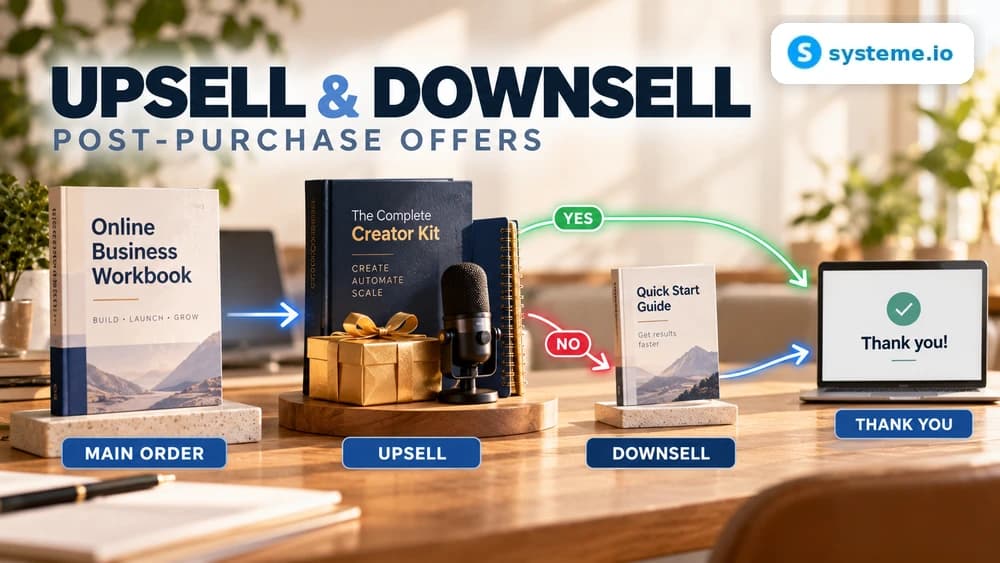
An upsell is a second buying opportunity presented after the customer completes the main order. Because the original purchase has already happened, the page should extend the result rather than make the customer reconsider the product they just bought.
A downsell is the alternative path shown when the upsell is rejected. It should solve a similar next problem with a lighter commitment, lower scope or different format instead of presenting a completely unrelated product.
Create dedicated funnel steps and keep them after the main order form
Inside the sales funnel, add a step with the Upsell type and, when needed, another step with the Downsell type. Systeme.io requires the upsell to appear after the main order form and the downsell to follow the upsell in the funnel sequence.
Keep the thank-you page after the post-purchase offers so every path eventually ends in a clear confirmation. Correct step order matters because Systeme.io uses that sequence to route accepted and declined offers automatically.
Configure the product, delivered resource and price before editing the sales copy
The upsell or downsell can currently sell a digital or physical product. Digital offers can deliver supported resources such as courses, course bundles, tags or community access, while physical products use the product configuration already created in the account.
Add the required price plan before treating the page as ready. The commercial copy, price shown to the customer and resource delivered after acceptance must describe the same offer, otherwise a technically successful charge can still create a support problem.
Add explicit accept and decline controls so the customer can choose either path
Systeme.io requires accept and decline buttons on the post-purchase page. Make the accept action clear about the additional purchase and make the decline action visible enough that the page does not feel like a forced or confusing continuation of the checkout.
The best upsell page is usually shorter than the main sales page because the customer already knows the business and has completed a purchase. Focus on why the second offer is useful now, what changes if they add it and what the additional price is.
Treat the downsell as a deliberate alternative instead of a random cheaper product
A downsell should answer the reason a customer might reject the upsell. That can mean a smaller package, a self-service version, fewer deliverables or a lower-priced entry point to the same next outcome.
Do not automatically discount the exact same product without a reason, because that can make the original upsell price feel arbitrary. Design the downsell as a distinct offer with a clear difference in scope or delivery.
Test accepted and declined paths because post-purchase offers create separate charges
Systeme.io states that an accepted upsell or downsell is processed as a separate transaction from the main order. Run controlled purchases and verify the main charge, post-purchase charge, invoices, resource access and confirmation messages individually.
Test both branches: accept the upsell once, decline it to reach the downsell on another run, and decline both on a third run. Each path should finish at the intended thank-you step without asking the customer to repeat payment information unnecessarily.
Check these four signals.
✓Funnel steps are ordered checkout, upsell, downsell, confirmation
✓The upsell extends the original purchase logically
✓The downsell is a distinct lower-commitment alternative
✓Accepted and declined branches produce the correct charges and access
Need the bigger picture before choosing a plan?
Open the current offer and check Systeme.io pricing, limits and features before deciding on a subscription.
Official sources for this guide
Software pricing and features can change. Review the official documentation below before choosing a product or plan.